
ePS
Qualification Kit
(ePS-QKIT)

Your Solution for Safe Parallelization
The ePS Qualification Kit (ePS-QKIT) provides the tools and processes required for the safety qualification of emmtrix Parallel Studio according to DO-178C/DO-330, ISO 26262 and comparable functional safety standards.
This enables the use of our parallelization technology for safety-critical software of the highest safety levels. The kit is based on a verification tool that checks whether the sequential software (input) and the parallelized software (output) behave in exactly the same way.
Our Qualification Strategy
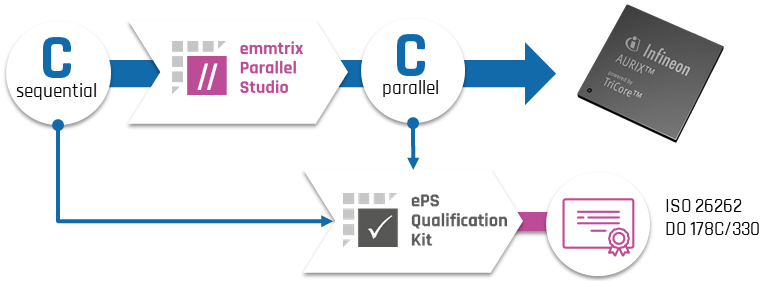
Figure 1: Qualification Strategy for the ePS Parallelization Workflow
Verify Each Parallelization
The ePS Qualification Kit includes the emmtrix Parallel Checker (ePC), which runs in the end user’s operational environment. It can be run after each parallelization to prove the correctness of the parallel C code and generate relevant safety documents.
Compare Sequential and Parallel C Code
ePC uses static code analysis to compare the sequential C input with the parallel C output. A check is successful only if the parallel code contains exactly the same calculations as the original code and is free of parallelization errors, including race conditions, deadlocks, synchronization faults and communication faults.
Qualify the Checker
This qualification strategy eliminates the risk of incorrect parallelization by checking the output of emmtrix Parallel Studio. The lower risk of the checker failing to detect incorrect behavior is eliminated by qualifying the checker using the qualification kit. This enables the use of ePS for safety-critical software up to the highest safety levels.
Key Features
-
Formal Equivalence Checking: Compare sequential input and parallel output code using emmtrix Parallel Checker.
-
Verification After Parallelization: Run the verification tool after each parallelization.
-
Parallelization Error Checks: Prove the absence of deadlocks and race conditions and detect synchronization and communication faults.
-
Transformation Error Detection: Detect potential errors introduced by emmtrix Parallel Studio.
-
Bidirectional Traceability: Trace statements between sequential and parallel C code.
-
Safety Reports: Generate reports documenting the verification results.
-
Operational Environment: Run the checker in the end user’s operational environment.
-
Diverse Implementation: The checker is developed using different programming languages and technologies for common cause avoidance.
Key Benefits
-
Functional Correctness: Guarantee the functional correctness of the parallelized code.
-
Preserved Safety Certification: Retain the safety certification of the input code.
-
Reduced Verification Effort: Use the verification tool to eliminate or reduce verification processes on parallel code in the DO-178C/DO-330 workflow.
-
Safety-Critical Parallelization: Use ePS in projects with functional safety requirements according to the qualification levels described below.
Qualification for Functional Safety Standards
ISO 26262
Up to ASIL D
-
Applicable up to the highest ISO 26262 safety level, ASIL D.
-
Uses the “validation of the software tool” qualification method.
DO-178C/DO-330
TQL 5 · Projects up to DAL C
-
Verification tool qualifiable according to TQL 5.
-
Verification tool can be used to eliminate or reduce verification processes on parallel code.
- Applicable to projects up to DAL C.
-
TQL 4 and DAL A on request.
See the Verification Report
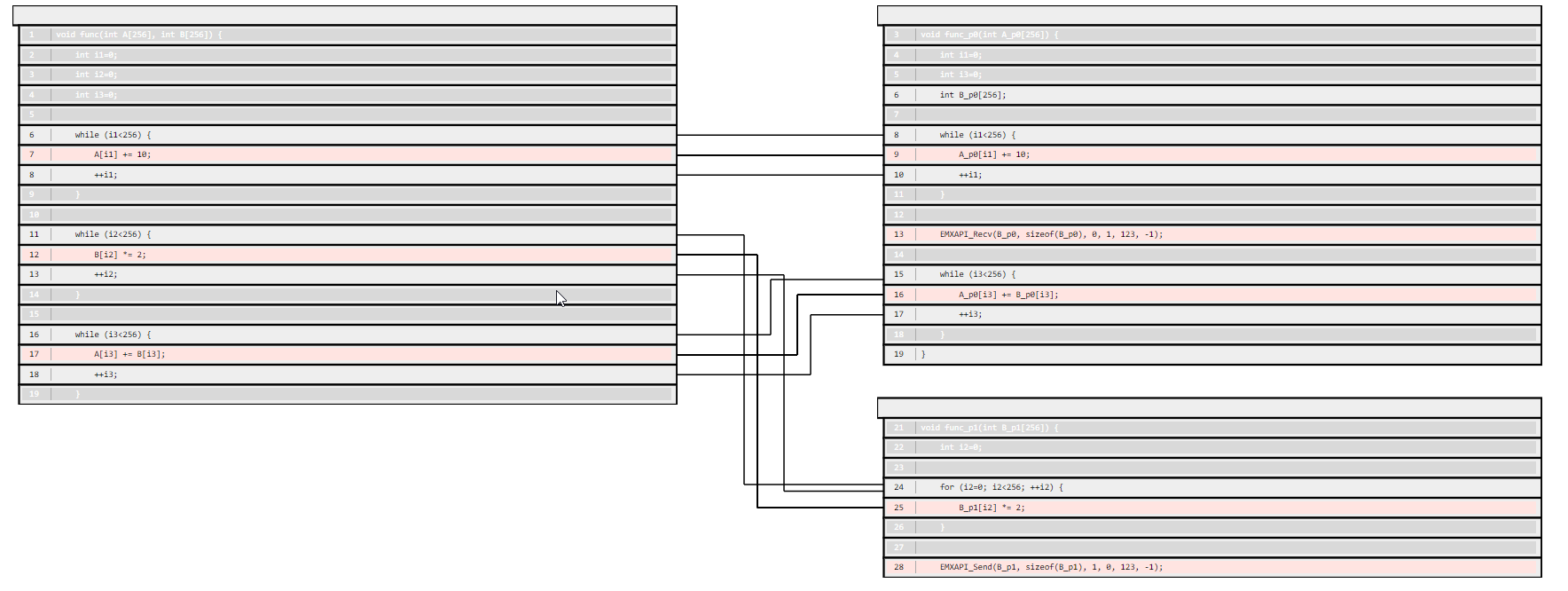
Figure 2: Bidirectional Traceability of Input and Parallel Output Code with Highlighted Sensitive Statements
The verification report provides bidirectional traceability between the sequential input code on the left and the parallel output code on the right.
In this example, one function is split into two parallel functions, each running on a different core. ePS inserts communication statements (EMXAPI_Send and EMXAPI_Recv) into the parallel source code.
The verification tool automatically identifies matching statements in both versions and visualizes the correspondence in the report. Sensitive statements, which may affect the outcome of the program, are highlighted in red.
Related Tools and Projects
emmtrix Parallel Studio
Explore the parallelization workflow of emmtrix Parallel Studio and its verification with the ePS Qualification Kit.
QSMA Research Project
Explore QSMA’s qualifiable avionics toolchain for parallelization, verified compilation and timing verification.
Expert Presentation
German · Approx. 30 minutes
Qualification Kit section starts at 24:43
Software Parallelization Considering Functional Safety
In this German-language presentation, Dr. Timo Stripf explains how sequential software can be automatically transformed into parallel programs using emmtrix Parallel Studio.
Starting at 24:43, he introduces the ePS Qualification Kit and shows how it supports functional safety workflows through equivalence checking and safety-relevant reports.
Frequently Asked Questions
What is the ePS Qualification Kit?
The ePS Qualification Kit provides tools and processes for the safety qualification of emmtrix Parallel Studio according to ISO 26262, DO-178C/DO-330 and comparable functional safety standards.
What does emmtrix Parallel Checker compare?
emmtrix Parallel Checker compares sequential C input code with the corresponding parallel C output generated by emmtrix Parallel Studio. It uses static code analysis to verify that both versions contain the same calculations and that the parallel output is free of parallelization errors.
Which parallelization errors are checked?
The verification checks for parallelization errors including race conditions, deadlocks, synchronization faults and communication faults.
Where and when does the verification tool run?
emmtrix Parallel Checker runs in the end user’s operational environment. It can be run after each parallelization to check the generated parallel C code and generate relevant safety documents.
Let’s Get in Touch
Are you planning to parallelize safety-critical software? Contact us to discuss your application, safety standard and qualification requirements, request a demo or start an evaluation.